What Serverless Fine-Tuning in SageMaker Means for Mid-Market Teams
By Kyle Jones
What Serverless Fine-Tuning in SageMaker Means for Mid-Market Teams
Custom AI has been difficult for mid-market companies to justify. Adapting a model to your own data — your product catalog, your support history, your terminology — has traditionally meant provisioning GPU infrastructure, managing training jobs, and paying for capacity you only use occasionally. For a team without a dedicated machine-learning function, that overhead has often been enough to keep the project on the shelf.
A recent AWS update changes that calculation. Amazon SageMaker AI now supports serverless fine-tuning for open-weight models, including NVIDIA's Nemotron family. It removes the infrastructure setup that made fine-tuning impractical for smaller teams.
What changed
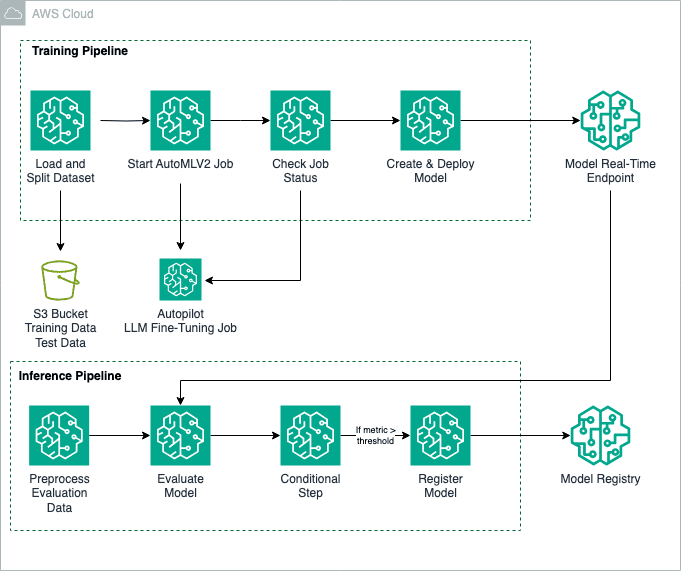
With serverless fine-tuning, you provide your data and the model you want to adapt, and AWS manages the compute. There are no instances to size, no clusters to provision, and nothing to decommission when the job completes. You are billed for the work you run rather than for reserved capacity.
In practical terms, this brings a fine-tuning project down from a multi-day infrastructure effort to something a developer can complete in a single session. The setup work that was never specific to your business is handled for you.
Who benefits most
This is most useful for teams that:
- hold proprietary data a general-purpose model has not seen,
- need consistent output in a specific format, tone, or domain vocabulary,
- want a smaller, lower-cost model to perform reliably on a narrow task, and
- do not have a dedicated ML infrastructure team.
The last point matters most for mid-market organizations. The barrier to custom AI has frequently been staffing as much as hardware, and the serverless model reduces both.
Deciding whether to fine-tune
It is worth being deliberate here, because fine-tuning is not always the right step. A reasonable sequence is:
- Start with prompt engineering. Clear instructions and a few examples resolve many use cases at no cost and with no commitment.
- Consider retrieval-augmented generation (RAG). If the issue is that the model lacks your information, retrieving your documents at query time is usually simpler to keep current and lower-risk than retraining.
- Fine-tune when you need to change behavior. If you need consistent style, formatting, or task handling that prompting cannot reliably produce, or you want a small model to specialize, fine-tuning is the appropriate tool.
A useful guideline: use RAG for what the model needs to know, and fine-tuning for how it should behave. Many production systems use both.
The cost angle
The serverless model also helps on cost. Traditional fine-tuning encouraged over-provisioning, and idle GPU time is wasted spend. Paying only for actual usage makes it practical to run a small pilot, measure the result, and scale only what proves valuable. For teams that want to keep their AWS spend disciplined, that is a meaningful improvement.
Summary
Serverless fine-tuning does not make custom AI free, and it does not make it the right answer in every case. What it does is remove the infrastructure barrier that kept many mid-market teams from evaluating it at all. If a custom AI project has been hard to justify until now, it is worth a fresh look.
Fastwater Cloud.ai helps mid-market teams adopt AWS AI services and manage their AWS spend effectively. If you are considering a custom AI project, reach out — we are glad to talk through whether it fits and how to approach it cost-effectively.