Three Ways to Build Intelligent Document Processing on AWS (and What Each Costs per Page)
By Kyle Jones
Intelligent document processing (IDP) is one of the most common first AI projects we see. Invoices, bills of lading, W-9s, claims forms and onboarding packets all arrive as PDFs and scans, and someone has to key the fields into a system of record.
AWS now offers three quite different ways to automate that work:
- Textract + Comprehend: the established ML pipeline. OCR, a custom classifier, and per-document-type extraction rules.
- Bedrock Data Automation (BDA): a single managed API that splits, classifies and extracts using blueprints you define.
- Step Functions orchestrating AgentCore agents: a workflow in which agents extract fields, then reason over them by checking purchase orders, looking up vendors and flagging exceptions.
Each is the right answer for some workloads and an expensive mistake for others. This post walks through each architecture, works out the cost per page, and closes with a decision guide.
All prices are US East (N. Virginia) list rates as of October 2026. Negotiated rates will change the totals, but not the structure of the result.
The Reference Workload
To keep the comparison honest, every architecture below processes the same thing: an accounts-payable inbox at a mid-market distributor.
- Invoices, packing slips and the occasional W-9, averaging three pages per document
- About 15 fields extracted per document (vendor, invoice number, dates, PO number, line items, totals)
- Hundreds of vendors, so many different layouts, plus some handwriting and poor scans
- Extracted data lands in the ERP; anything uncertain goes to a person
We'll price this at 10,000, 100,000 and 1,000,000 pages a month.
Architecture 1: Textract + Comprehend
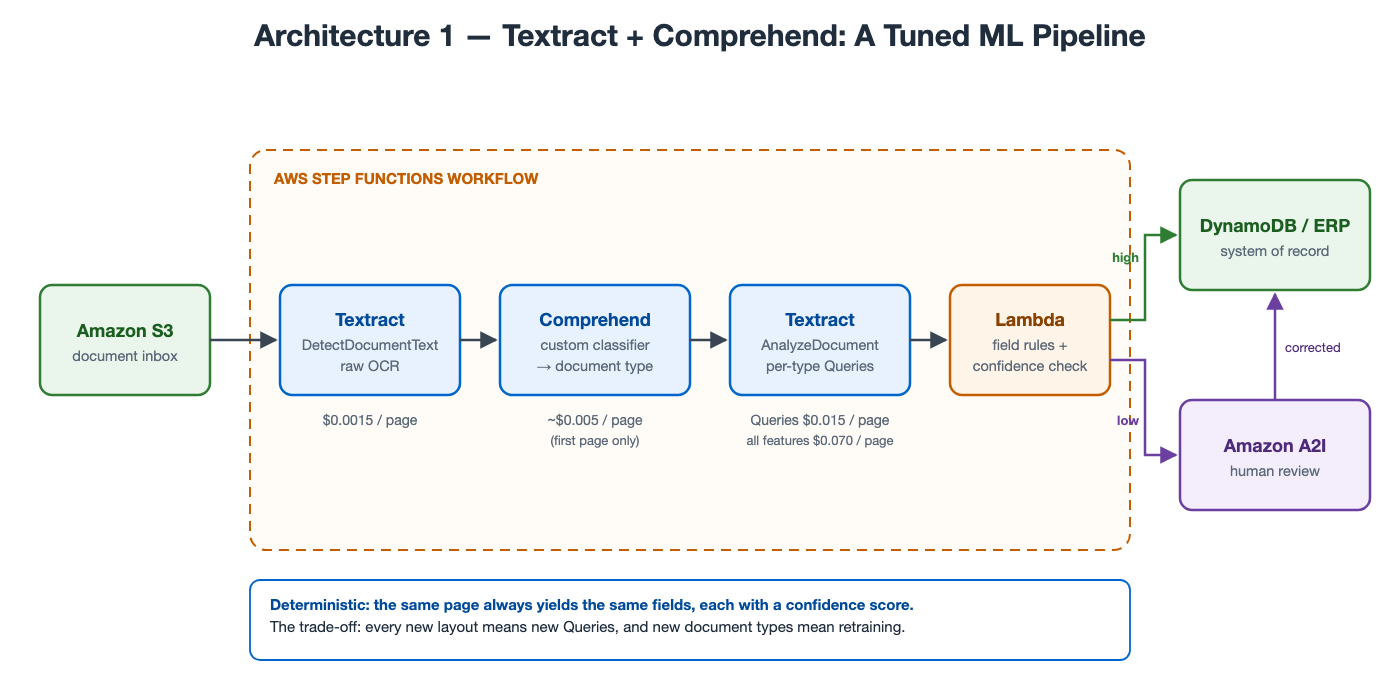
Architecture 1: OCR, classify, then extract with queries tuned to each document type. (Click the diagram to view it full size.)
This is the pattern behind AWS's own sample code for document processing, and it remains a solid design. A Step Functions workflow runs inexpensive OCR on each page, sends the first page's text to a Comprehend custom classifier to identify the document type, then calls Textract AnalyzeDocument with Queries written for that type ("What is the invoice number?", "What is the PO number?"). A Lambda function applies field-level rules and confidence thresholds, and anything below threshold goes to Amazon A2I for human review.
What it costs per page:
| Step | Tuned (Queries only) | Every feature turned on |
|---|---|---|
| Textract DetectDocumentText | $0.0015 | $0.0015 |
| Comprehend custom classification (first page, ~3,000 characters) | ~$0.005 | ~$0.005 |
| Textract AnalyzeDocument | $0.015 (Queries) | $0.070 (Forms + Tables + Queries) |
| Total | ~$0.022 | ~$0.077 |
Comprehend also charges $3 an hour for training and $0.50 a month per custom model, which is negligible at any real volume.
The spread in that table is the main point about this architecture. Tuned, it is the cheapest option in this post. Untuned, it is the most expensive. Reaching the tuned number means deciding, for each document type, exactly which Textract features and queries you need. That is the engineering cost, and it recurs every time a new vendor layout appears.
The strengths are real: results are deterministic (the same page yields the same fields every time), every field carries a confidence score, and nothing in the pipeline produces text it did not read from the page. For high-volume, stable document types (a single insurer's claim form, a government form) it is hard to beat.
One signal worth noting: AWS stopped offering several Comprehend features (topic modeling, event detection, prompt safety) to new customers on April 30, 2026, and recommends Bedrock for those use cases. Custom classification and custom entities are unaffected, but AWS's investment is clearly going to Bedrock.
Architecture 2: Bedrock Data Automation
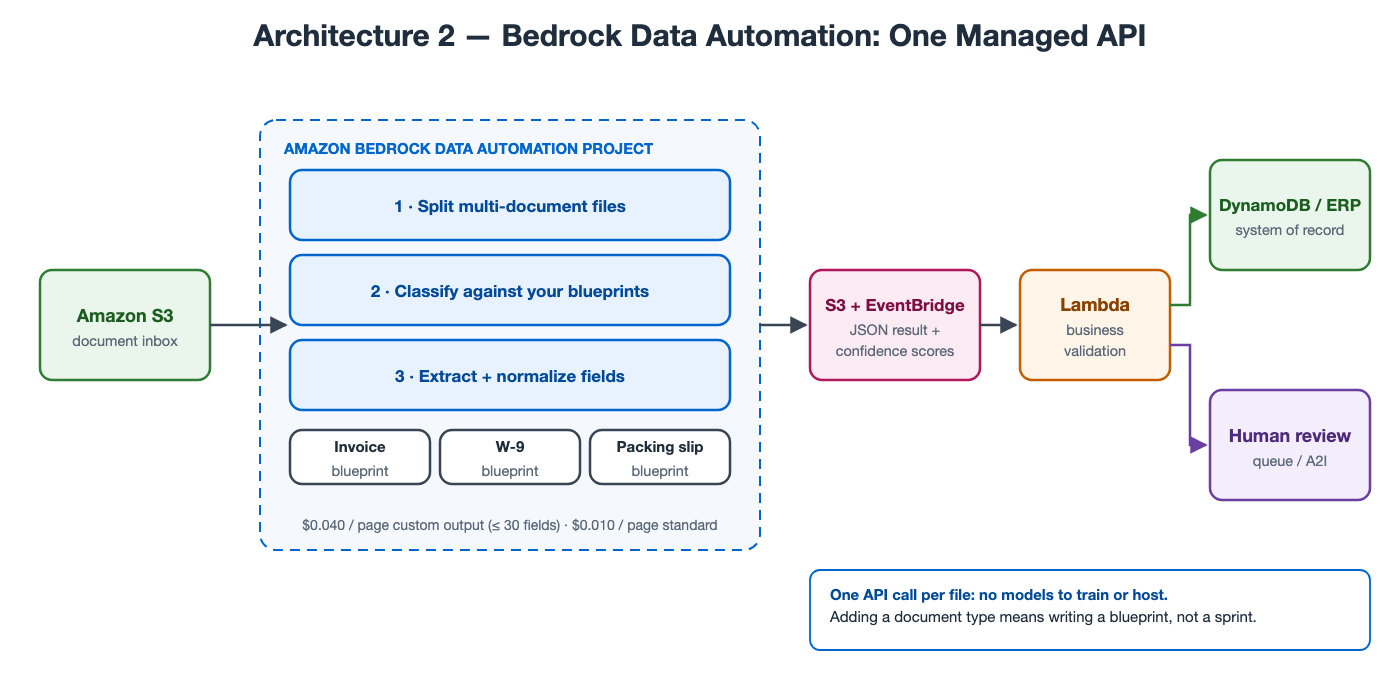
Architecture 2: one API call per file. BDA splits, classifies and extracts against your blueprints.
BDA collapses most of Architecture 1 into a managed service. You create a project, attach a blueprint for each document type (a field list described in plain language, such as "the PO number, usually labeled PO# or Purchase Order"), and submit files. BDA splits multi-document PDFs, classifies each document against your blueprints, extracts and normalizes the fields, and returns JSON with confidence scores and bounding boxes. A file can run to 3,000 pages.
What it costs per page:
| Output type | Per page |
|---|---|
| Standard output (text, layout, tables, summary; no custom fields) | $0.010 |
| Custom output, blueprint with up to 30 fields | $0.040 |
| Each field beyond 30 | +$0.0005 |
Our 15-field invoice blueprint comes to $0.040 per page, with splitting and classification included. That is roughly twice the tuned Textract pipeline and about half the untuned one.
What you get for the difference is time. Adding a new document type means writing a blueprint, not training a classifier and writing a new set of queries. Handling a new vendor layout usually means nothing at all, because BDA reads by meaning rather than by position. There are no models to train or host, and no per-type routing logic to maintain.
The trade-off is control. You configure BDA through blueprints rather than code, so when a field comes back wrong your options are to refine the blueprint's instructions or to handle the case downstream. For most teams that is a good trade.
Architecture 3: Step Functions + AgentCore Agents
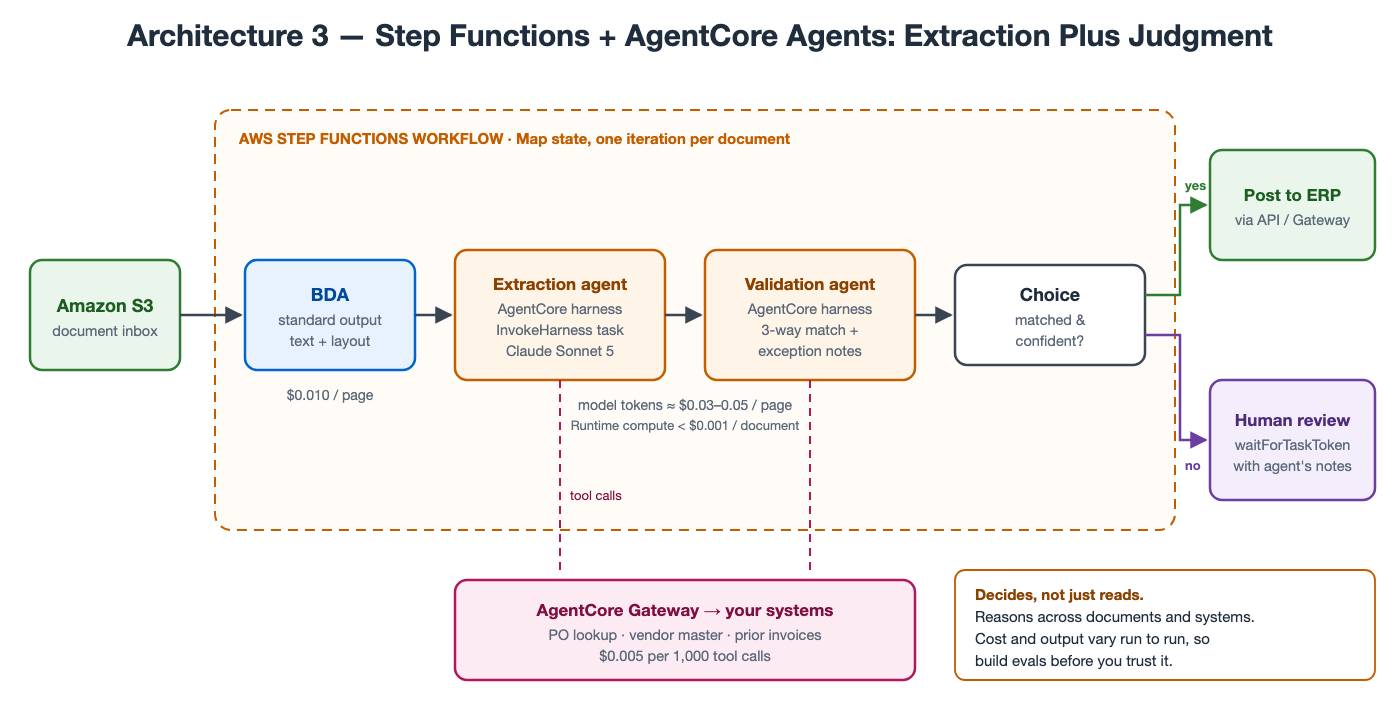
Architecture 3: extraction plus judgment. Agents check what they read against your systems before anything is posted.
The first two architectures answer the question what does this document say? Architecture 3 also answers is it right, and what should happen next?
A Step Functions workflow iterates over documents with a Map state. Each document gets inexpensive BDA standard output for text and layout, then passes to two agents hosted on Amazon Bedrock AgentCore:
- An extraction agent turns the text into the structured fields you need.
- A validation agent uses tools exposed through AgentCore Gateway to look up the purchase order, check the vendor master, compare against prior invoices, and either approve the match or write a plain-language note explaining the exception ("Quantity on line 3 exceeds the PO by 40 units; the vendor has done this twice this quarter.").
Step Functions now has an optimized integration for this, so no Lambda function sits in between:
"ValidateInvoice": {
  "Type": "Task",
  "Resource": "arn:aws:states:::bedrockagentcore:invokeHarness",
  "Arguments": {
    "HarnessArn": "${ValidationHarnessArn}",
    "RuntimeSessionId": "{% $uuid() %}",
    "Messages": [{
      "Role": "user",
      "Content": [{ "Text": "{% $string($states.input.fields) %}" }]
    }],
    "MaxIterations": 10,
    "TimeoutSeconds": 300
  },
  "Next": "MatchedAndConfident"
}
Two operational details matter. First, the integration supports request/response only and caps each task at 15 minutes. Second, stopping the execution does not stop the agent, so set the harness's own timeout below 15 minutes.
What it costs per page. The cost structure here is different from the other two, and it surprises most people:
| Component | Per document (3 pages) | Per page |
|---|---|---|
| BDA standard output | $0.030 | $0.010 |
| Claude Sonnet 5 tokens, both agents (~45K input, ~3K output at $2 / $10 per million) | ~$0.12 | ~$0.040 |
| AgentCore Runtime (CPU billed only while active, not during model or tool waits) | ~$0.0006 | ~$0.0002 |
| AgentCore Gateway (~4 tool calls at $0.005 per 1,000) | ~$0.00002 | — |
| Step Functions Standard (~12 transitions at $0.000025) | ~$0.0003 | ~$0.0001 |
| Total | ~$0.15 | ~$0.05 |
Compute is a rounding error; tokens are the bill. AgentCore Runtime charges $0.1276 per vCPU-hour and $0.0169 per GB-hour, but an agent spends most of its time waiting on the model and on tools, and CPU isn't billed during that wait. The number to manage is tokens per document. That number also varies: a clean invoice that matches its PO on the first lookup might use half our estimate, while a messy one that sends the agent through several rounds of lookups might use double. Plan for $0.03 to $0.09 per page rather than a fixed figure, and use the cheaper Claude Haiku 4.5 ($1 / $5 per million tokens) for steps that do not need Sonnet-level reasoning.
Notice also that the agents still pay for OCR underneath. Agents add judgment on top of extraction; they don't replace it.
Side by Side
Monthly cost for the reference workload:
| Pages / month | Textract + Comprehend (tuned) | Textract + Comprehend (all features) | Bedrock Data Automation | Step Functions + AgentCore |
|---|---|---|---|---|
| 10,000 | ~$220 | ~$770 | $400 | ~$500 |
| 100,000 | ~$2,200 | ~$7,700 | $4,000 | ~$5,000 |
| 1,000,000 | ~$22,000 | ~$77,000 | $40,000 | ~$50,000 |
The Step Functions + AgentCore column uses the $0.05-per-page midpoint; at $0.03 to $0.09 per page, the 100,000-page month lands anywhere from $3,000 to $9,000. Above a million pages a month, Textract's per-page rates step down further, which widens the tuned pipeline's lead at very high volume.
Everything the invoice doesn't show:
| Textract + Comprehend | Bedrock Data Automation | Step Functions + AgentCore | |
|---|---|---|---|
| Time to first production document type | Weeks | Days | Weeks |
| Cost of adding a document type | Retrain classifier, write queries | Write a blueprint | Update prompts and tools, re-run evals |
| New vendor layouts | Often need query tuning | Usually handled | Usually handled |
| Determinism and auditability | High | High | Lower; log every reasoning trace |
| Can reconcile against your systems | No (custom code) | No (custom code) | Yes, natively |
| Cost predictability | Exact | Exact | A range; monitor tokens per document |
At these volumes, the per-page differences are small next to the cost of the people doing the work by hand today. The bigger risk is choosing an architecture whose engineering and maintenance burden your team cannot carry.
Which One Should You Pick?
Start with Bedrock Data Automation if your documents vary, your team is small, and the job is extraction. That describes most mid-market IDP projects. It has the shortest path to production, a predictable per-page price, and the least to maintain.
Choose Textract + Comprehend when volume is high and document types are stable: a few well-defined forms at hundreds of thousands of pages a month or more. Once the tuning is done, the tuned pipeline costs about half as much as BDA per page, and that saving compounds. It is also the most conservative choice where an auditor wants identical output for identical input.
Choose Step Functions + AgentCore when extraction is not where the cost lies. If your AP team's time goes into three-way matching, chasing exceptions and deciding what to do about discrepancies, extraction-only systems will only get you partway. Agents can take on the judgment work, as long as you build an evaluation set, log every decision, and keep a person in the loop for anything the agent is unsure about.
Most of the time, the best answer combines two of them. Use BDA for extraction because it is cheap, predictable and low-maintenance. Then add an agent step only for the documents that fail validation or need a decision, rather than for every page. If 15% of invoices are exceptions, that hybrid costs about $0.046 per page, very close to BDA alone, and it handles the work your team actually spends its time on.
Fastwater Cloud is an AWS Partner working with small and medium sized businesses on AI and data systems. If you are evaluating document automation, or trying to work out why an existing pipeline costs more than expected, we are glad to work through the architecture and the numbers with you.